For those individuals looking to create a website generating lots of content, but not looking to spend loads of money on a web designer, perhaps choosing a great Content Management System (CMS) is the way to go.
A Content Management System, such as Drupal, Joomla, and WordPress, takes the need for a web designer out of the picture and puts you in the driver’s seat. What this CMS software does is generate a set base of code, wrap it in a template design, and then translate the means to create and manage a website into a friendlier and readable mode. At this point, adding pages of information becomes as simple as filling out a text box, each of which can be organised in an easy-to-follow nested fashion. Basically, beyond the initial setup process (which Digital Pacific can help you with), a Content Management System makes it easy for anyone to create and manage their own website. However, which one of all the great systems out there should someone choose?
Digital Pacific has decided to make the process easier by comparing briefly three greats: Drupal, Joomla!, and WordPress.
What they all have.
Each of these amazing systems is available for use by any business or individual for free. They are all Open Source systems being constantly worked and updated by teams of volunteers around the world. In this sense, the software will never be out-of-date as any new updates and additions will be what people actually want and need. Support for the software is brought to the user in the form of a community effort. Most importantly, they each provide the user with an easy-to-use and access control panels that make the web building process a snap. When this system is combined the use of pre-made themes and add-on features (many free), who really needs a web designer?
A closer look.
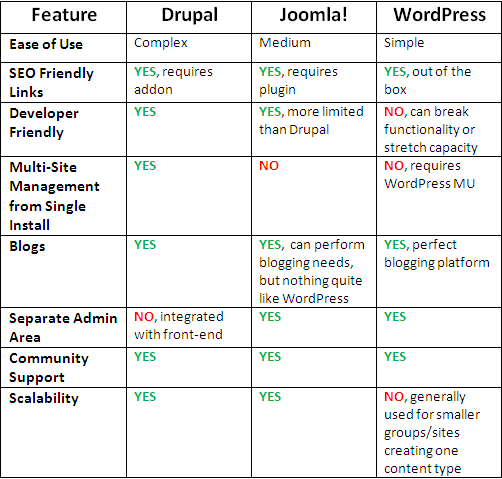
Drupal is said to have the longest learning curve of the three options listed, but many also say that once the software is learned, you won’t want to work with anything else. Drupal has a large list of features and add-ons that make the content management system one to manage even the most complex sites. However, the need to learn the entire system and coding is a downfall for many users. Another feature to point out is that the website and control panel are integrated instead of separate which may or may not be an issue for you.
• View the Demo at http://php.opensourcecms.com/scripts/details.php?scriptid=191
Joomla! is probably more user-friendly than Drupal from the install, but is said to be less powerful. However, Joomla! has an extremely large following and support group providing more and more improvements and features. As opposed to Drupal, it has a separate control panel and cannot run more than one site on the single install.
• View the Demo at http://demo.joomla.org/
WordPress seems to be a very simple and easy to use program directly from the install. Many people think that WordPress is mainly blog focused and will not be great for large websites with loads of content. However, more and more examples of non-blog websites are being produced with this CMS proving it can be used for more than casual blogging. WordPress is a very popular system meaning many users are constantly creating new and free template designs and add-on features. As opposed to Drupal, the control panel is separate from the main website. WordPress is great for use if looking for feedback and interaction through the great commenting system.
• View the Demo at http://php.opensourcecms.com/scripts/details.php?scriptid=88
Evaluate your needs.
When choosing a CMS, you must think about and evaluate your website needs. With the information presented above, those users looking to play around with code and have complex content-driven sites should choose the Drupal system. For those looking for some ease-of-use combined with developer capabilities, Joomla! is the software of choice. Finally, for those looking for quick and easy solutions to produce websites with constantly updated content and the ability for interaction, WordPress is the option.
We want to hear from you. What do you think about each of these Content Management Systems? Also be sure to take our poll to show which you would or do choose.